How to Post a Blog in WordPress
The following guide was prepared using the Classic Editor in WordPress 5.0.
1. When publishing a blog, be prepared with the following information
- Publish Date (if not today)
- Title
- Short description including keyword (this will show up under the page title in search results)
- Keyword
- Image (optional, but recommended)
- Content
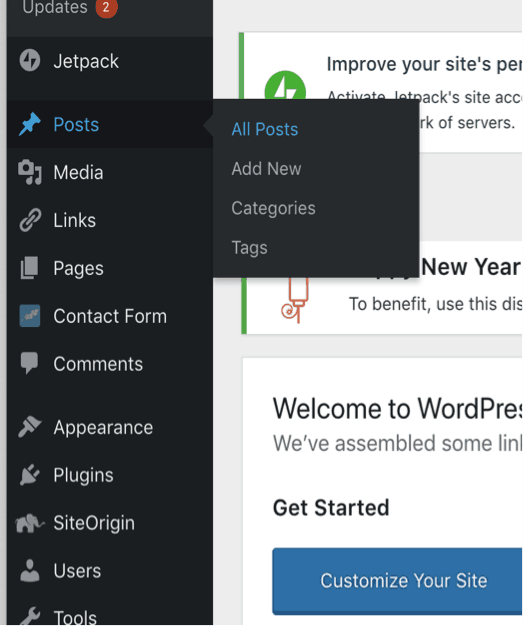
2. In your WordPress website, in the left menu, click Posts - All Posts
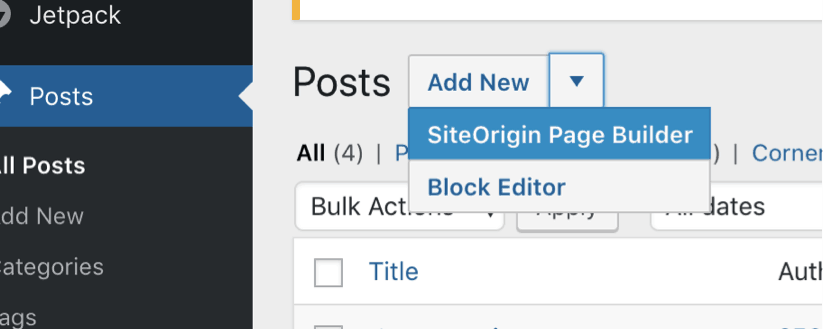
3. Click the arrow next to add new and choose SiteOrigin Builder
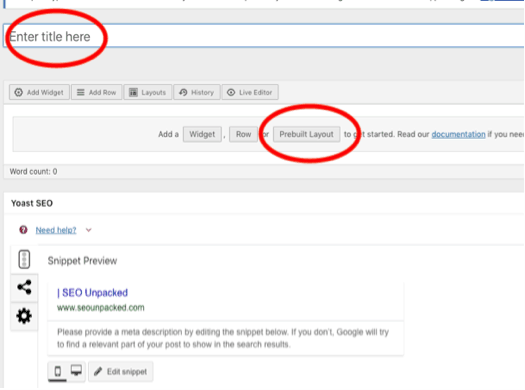
4. In the top field, type the title of the blog. Then click Prebuilt Layouts.
-
- Click Clone: Posts
- Click Blog Template
- Click Insert
- Click Insert before
- Confirm
5. (Optional) . If present, locate the field for blog title graphic (it may be easier to use Live Editor)
- Click Edit
- In the Widget, under Image file, click Choose Media
- Click Upload files or skip to step 7
- Drag files to the window or click upload and select
- To the right, under attachment details, rename the file title to the keyword
- Click Set Media
6. (Optional) Scroll down to Set Featured Image on the right menu and click
- Click the same image as above and click Set Featured Image
7. Locate the blog content field, click Edit
- Paste the blog content over existing content
- Click done.
8. On the right, under categories, check all that are appropriate
9. Scroll down to Snippet Preview
- Click Edit Snippet
- Under Meta Description, paste the short description
- Under Focus keyword, paste the keyword
10. Scroll to top right section to publish
- On a specific date
- Click edit
- Change to the appropriate date
- Click OK
- Click Schedule
- Click edit
- Immediately
- Click publish
- Click publish
- Click the link to view the blog and ensure it posted correctly
This information is current as of March 2022. Exact posting process may vary slightly depending upon your version of WordPress and active plugins.